

In this series I want to challenge a myth I keep running into: that migrating data and analytics solutions from one Azure environment to another is always a simple lift-and-shift exercise, because after all, we are still inside the same cloud.
There may be cases where that holds true. Mine have been different. Everything I describe here comes from real migration projects, most of them for a large international company, and all of it focused on data and analytics, so your mileage may vary.
Why migrate from Azure to Azure at all?
The first question I usually get is why we migrate from Azure to Azure in the first place. Didn’t I mean on-premises to Azure? No. I mean Azure to Azure, and the reason goes back several years.
Around six to eight years ago, many companies started building data and analytics solutions in Azure because it promised scalability, flexibility, and the ability to start developing without waiting weeks for infrastructure. That promise was real. It is genuinely easy to start building something in Azure.
The problem, at least in my scenario, was that multiple teams started building independently, with no shared standards, patterns, or best practices. Every team picked the services it already knew, wanted to try, or thought looked interesting at the time.
How the Azure Data Platform Became a Problem
Platform-wide naming standards? There were none. Security and private networking? Public access to almost everything, no firewalls, no defined network architecture. Reusable CI/CD templates? No, every team did its own thing, often manually, sometimes straight onto production.
After a few years of fast development, the same problems kept surfacing. No unified standards or best practices. A huge variety of Azure services doing more or less the same things. No one who could say what was actually deployed, what it did, what data it used, or who consumed that data. Security that was not tight enough, where it was considered at all. A long list of isolated networks with overlapping IP ranges that were difficult to connect. Manual, error-prone deployments. Maintenance that was both hard and expensive. And no clear visibility into costs.
Look at that list and one thing becomes obvious: the foundational Azure design was missing from the start, which left the door open for an ad-hoc style of development. Microsoft used to cover exactly this area through its Cloud-Scale Analytics documentation, which has since been deprecated and replaced by “Unify your data platform for AI and analytics.”
This is the point where customers start asking what to do next. Broadly, there are two options.
The first is to fix the existing Azure data platform in place. Introduce the governance, naming, networking, and security that were missing, then adjust every solution already deployed on top of it. It sounds appealing because nothing moves and nothing gets rebuilt. The catch is that you are reworking the foundations of a live environment while dozens of workloads keep running on it, with no reliable map of what depends on what. Every change risks breaking something nobody documented. And once the platform is fixed, you still have to go back to each solution and bring it in line with the new rules.
The second option is to build a new data platform from scratch, follow best practices from day one, and then migrate the existing solutions onto it. The platform itself starts clean: consistent naming, proper network design, identity and access management, and CI/CD templates are in place before the first workload arrives. The solutions still have to be moved, which is what the rest of this series is about, but at least the target they move to is a platform that was designed properly from the start.
In this series I focus on the second approach, because that is the one we chose. It was considered simpler and cheaper than reworking the existing environment, and that is where Azure to Azure migration comes from.
What Stakeholders Expect from an Azure Data Migration
Let me skip ahead. Assume the new, properly designed Azure data platform is ready and waiting for workloads. Assume we have already picked the first solution to migrate. How to choose that first solution wisely is a topic for later.
When you discuss the migration with stakeholders, they usually expect it to be quick and easy. We are moving from Azure to Azure, so surely it is just lift-and-shift, right? In their heads, the timeline looks roughly like this:
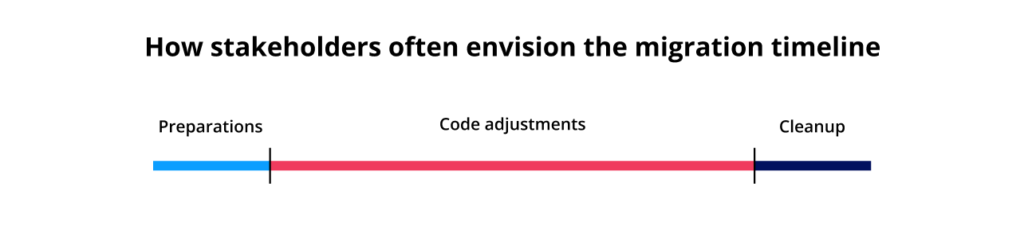
This is not a real project plan. The line lengths are only illustrative and will differ from project to project. The point is the perceived order and effort, not exact durations.
What matters here is the belief baked into that picture. Stakeholders assume the code adjustments are the most time-consuming part, with a bit of preparation before and some cleanup after. Beyond that, they expect the whole thing to move fast, like changing a few connection strings.
My experience says otherwise. Code changes are rarely the hard part, especially now that AI can help with them. The work that actually consumes the timeline happens before anyone touches the code, and some of it is not obvious at the start.
There is data that fits this pattern. A McKinsey survey of nearly 450 CIOs and IT decision-makers found that 75% of cloud migrations ran over budget and 38% ran behind schedule, with roughly $100 billion in migration spend expected to be wasted over three years. That is what tends to happen when a plan assumes the source environment is simpler than it really is.
So let me walk through the phases I usually go through during a migration, starting with the first one.
The Discovery and Analysis Phase
The goal of this phase is simple: understand, at a high level, what we are dealing with, so we can estimate the effort and sketch a rough timeline.
To do that, I assign each solution a T-shirt size (Small, Medium, or Large) based on a few key criteria: the general architecture, the Azure services used, the volume of data processed and produced, and so on. A Small might be a single pipeline moving a modest amount of data through one or two services. A Large might span many services, process high volumes, and connect to several upstream and downstream systems.
The point of this sizing is not precision. At this stage I do not need to know exactly how many days a migration will take. I need a rough sense of relative effort, enough to put the solutions in a sensible order and give stakeholders a timeline I can actually defend.
Getting the information to assign even that rough size is the hard part.
Sometimes it was genuinely difficult to find a single person who could answer the questions. Why? Because the product owner is usually a business person who does not know the technical details, assuming the product owner can be identified in the first place.
So you ask the development team. But if the project was built several years ago, the original team may no longer be around, especially if it was delivered by a vendor brought in just for that one project.
Then surely the documentation will help? It would, if it existed and was kept up to date, which, as we all know, is not always the case.
Fortunately, in most cases there was a support team that could answer at least some of the questions.
The whole process of pulling this information together was painful. To make it repeatable across projects, I created an Excel file with a long list of questions and sent it to the product owner to complete. Looking back, that file was too complex. I tried to capture a lot of detail that was not really needed at this stage, and I would do it far more simply today.
So we sent the file and waited for the answers. And waited.
Depending on the project, it could take anywhere from a few days to a few weeks to get the file back. And getting it back did not mean the phase was over. Too often the answers contradicted each other, or turned out to be wrong. Sometimes questions were quietly skipped. We usually needed several rounds of clarification, and it almost always ended with a call to work through whatever was still open.
Why Discovery Takes Longer Than the Plan Assumes
In total, this phase alone could take two to three weeks. The actual effort from the migration team was much smaller, since most of that time was spent waiting for answers. But it stretched the overall timeline all the same.
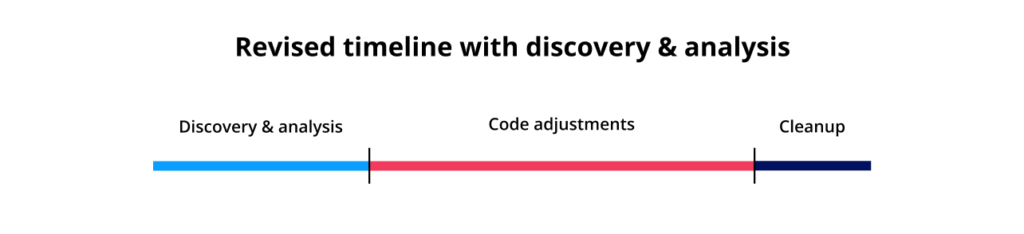
The biggest change in the revised timeline is that the vague “preparations” block is replaced with something more precise: discovery and analysis. In later parts of the series I will keep adding phases to this picture.
One more thing on this phase. I am well aware that AI can dramatically simplify discovery and analysis today. I actually built a proof of concept for it, and the results were at least as good as the manual approach. For future Azure data migration work, this is where I expect automation to pay off first.
What This Means for Cloud Data Platform Modernization
This is already the first reason why Azure to Azure platform migration is often far from a simple lift-and-shift exercise. Before you provision any infrastructure, change any code, or move any data, you first have to understand what you are actually migrating. And in real projects, even that can take much more time than anyone expects.
So when someone tells me an Azure to Azure migration will be quick because it is the same cloud, I no longer argue about connection strings. The code is rarely the hard part. The time goes into everything that comes before it, starting with working out what each solution actually does and who still understands it well enough to tell me. In every project I have worked on, building that picture took longer than anyone planned for. It is the same lesson behind every cloud data platform modernization I have been part of: you cannot move what you do not yet understand.
In the next episode I will cover the phases that follow discovery: infrastructure provisioning on the new platform and the data access requests that shape the actual migration window.
Would you like more information about this topic?
Complete the form below.