

- 1. The equivalent dbt test
- 2. Are DMFs and dbt interchangeable?
- 3. How failure handling differs across the stack
- 4. CI/CD: where DMFs fit, and where they do not
- 5. Production corner cases
- 6. DMFs vs external observability tools
- 7. Cost comparison
- 8. Where DMFs stop and observability begins
- 9. Final conclusion
- 10. FAQ
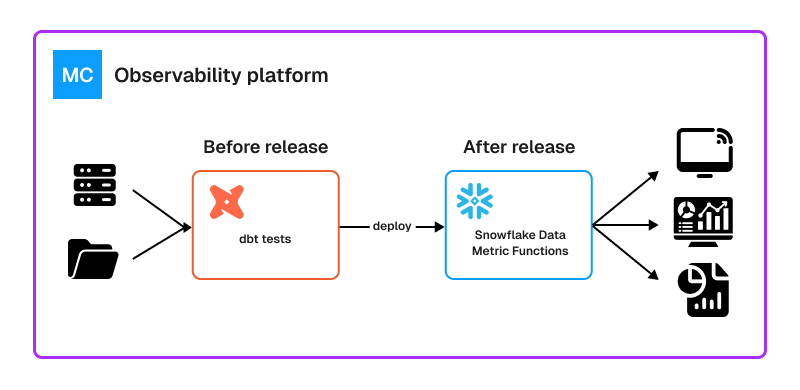
In the first article, I covered how Snowflake Data Metric Functions work: how they are attached to Snowflake objects, scheduled, paired with expectations, extended with custom SQL, and inspected through Snowflake’s monitoring interfaces.
This follow-up starts from a different question.
Where should DMFs sit in a stack that already uses dbt tests, CI/CD checks, orchestration tools, and perhaps an external observability platform?
For teams already running production workloads on Snowflake, this is a design decision inside an existing data quality framework, not a tool selection exercise. The question is which layer should own a given check.
The answer cannot be found by comparing check syntax alone. A null check can exist in dbt, Snowflake, or an observability platform. What changes is when it runs, what it protects, how the failure is reported, and what happens next.
To understand where DMFs fit, we need to compare their lifecycle, operational model, failure workflow, cost, and production limitations.
The equivalent dbt test
The same idea expressed in dbt looks different because it lives in a different part of the workflow.
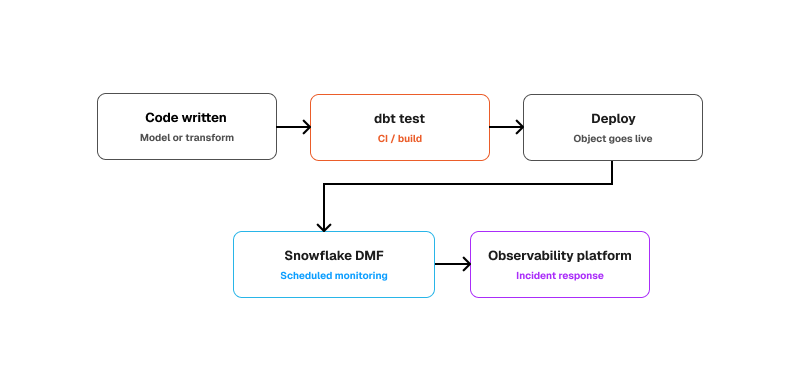
dbt’s model is project-centric rather than object-centric. The test definition lives in the project, is version controlled with the rest of the transformation logic, and runs as part of the build process. Data tests are SQL queries that return failing rows, with generic tests such as unique, not_null, accepted_values, and relationships available out of the box.
models:
 - name: customers
   columns:
     - name: customer_id
     - name: email
       data_tests:
         - not_null
A dbt test is close to the transformation code. It helps answer questions like:
- Did this model change break a core assumption?
- Should the pipeline fail before deployment?
A DMF is attached to the resulting object and helps answer a later question:
Is this object still healthy in production according to the metric and expectation defined on it?
Are DMFs and dbt interchangeable?
If you compare them only by syntax, they can look almost identical:
- Both can check nulls.
- Both can check uniqueness.
- Both can express quality rules.
But that is not the right comparison. dbt tests are part of development and deployment. They are designed to catch regressions before release, live naturally in Git, and fit into CI/CD.
DMFs operate after the object exists in Snowflake. They are attached to supported Snowflake objects and run as scheduled or trigger-based monitoring checks.
The overlap in rule types is real, but the role in the lifecycle is different. dbt is a build-time validation layer, while DMFs are a runtime monitoring layer.
Both layers execute data quality checks that look similar in SQL. The difference is the moment in the lifecycle at which the check has authority to stop something.
How failure handling differs across the stack
The first article showed how to inspect DMF metric values and expectation results inside Snowflake. The bigger operational question is how that workflow compares with the other layers in a modern data quality stack.
Creating a check is only half of the job.
The other half is understanding:
- Where the failure appears
- How quickly the team sees it
- What information the result contains
- Whether the pipeline should stop
- Who is expected to investigate
- etc…
A dbt test normally produces an immediate pass-or-fail result during a build or CI job. It is close to the code change and can stop a deployment before the problem reaches production.
A Snowflake DMF measures data on an existing Snowflake object. The metric result, expectation outcome, grouped context, or anomaly status then shows whether the production data requires attention.
An external observability platform usually starts from an alert or incident. Its value is not only detecting the issue, but adding context such as lineage, ownership, upstream changes, downstream impact, and possible root cause.
This creates three different operational patterns:
dbt tests: catch broken assumptions before deployment.
Snowflake DMFs: monitor important Snowflake data after deployment.
Observability platforms: investigate and manage incidents across a wider data stack.
The next sections show where to look, what the result means, and how each tool supports the response process.
dbt tests
The dbt failure workflow is simpler. A dbt test fails when the test query returns failing rows. In practice, you usually check failure in one of two places:
- the dbt test CLI / CI output
- the run_results.json artifact, which contains status, failures, and messages
That makes dbt tests easier to interpret during development: they are close to the code change that caused the failure.
Monte Carlo and similar tools
With Monte Carlo, the workflow is less about querying one result table and more about responding to an alert or incident. You usually start from a monitor alert, then move into lineage, impact analysis, and root-cause views. That is the real difference: a DMF tells you a metric crossed a threshold on one object; Monte Carlo is designed to help you investigate how far that problem spreads and where it came from.
Practical summary
If the question is only how do I check failure, the split looks like this:
- DMFs: query Snowflake result views/functions, inspect metric values, expectation status, and grouped context if relevant
- dbt tests: check CLI / CI output and run_results.json
- Monte Carlo: start from an alert or incident, then investigate through lineage and impact views
CI/CD: where DMFs fit, and where they do not
DMFs can be part of a CI/CD pipeline, but only in a specific way.
They fit well when the goal is to deploy monitoring together with Snowflake objects. They fit much less well when the goal is to fail a pull request immediately like a normal test.
Deploying DMFs through CI/CD
DMFs fit naturally into CI/CD when the goal is to deploy monitoring together with the Snowflake objects it protects.
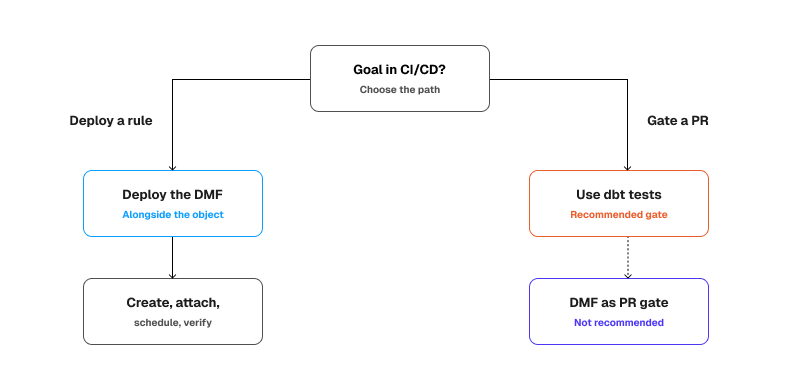
If your team already deploys Snowflake objects through version-controlled SQL files, adding DMFs is not a major change. The SQL from the first article can be stored in the repository, executed during deployment, and reviewed like the rest of the database code.
A simple deployment flow looks like this:
- Deploy the table or view.
- Create or update the custom DMF, when one is required.
- Attach the DMF to the object.
- Add the expectation.
- Configure the schedule.
- Verify that the association exists.
In this workflow, CI/CD is provisioning and configuring the monitoring rule. It is not waiting for the scheduled check to produce a pass-or-fail result. Snowflake monitoring then ships as code, on the same release path as the objects it covers.
The hard part: using DMFs as a pull-request gate
DMFs in theory can be used for immediate validation, but that is not recommended.
You can call a DMF directly in SQL without waiting for a scheduled evaluation. This can be useful when you want to test the metric logic or reuse the same Snowflake-native metric inside a pipeline.
However, turning that call into a pull-request gate still requires:
- A Snowflake object containing the data to validate
- The required Snowflake privileges
- SQL execution inside the pipeline
- Logic that interprets the returned value
- A threshold that determines whether the pipeline should fail
- At that point, you are using the DMF as an ad hoc validation query rather than using its main monitoring model.
Simply speaking it’s just not recommended overcomplication.
dbt tests fit this workflow more naturally. They live inside the transformation project, run together with the model code, return failing rows, and provide the direct pass-or-fail behavior expected from a CI check.
The practical split is:
- Use dbt tests as the main pre-merge quality gate.
- Deploy DMFs through CI/CD as production monitoring rules.
DMFs belong in CI/CD as objects to deploy. They are not the best tool for deciding whether a pull request should be merged.
Production corner cases
The first limitation is interval scheduling.
Snowflake does not accept arbitrary minute values for DMF interval schedules. The supported values are 5, 15, 30, 60, 720, and 1440 minutes. Cron schedules offer more flexibility, but the effective interval must still be at least five minutes.
The second limitation is trigger-based scheduling.
TRIGGER_ON_CHANGES can react to data changes on supported table-like objects. It is not supported for views, and changes caused only by reclustering do not trigger an evaluation.
The third limitation is suspension.
To suspend all DMFs associated with an object, set DATA_METRIC_SCHEDULE to an empty string:
ALTER TABLE customers
SET DATA_METRIC_SCHEDULE = '';
Do not use UNSET DATA_METRIC_SCHEDULE as a stop command. Unsetting the parameter restores the default schedule of 60 MINUTE.
The fourth limitation is cron behavior.
If both a specific day of the month and a day of the week are included in the cron expression, Snowflake uses OR logic. The DMF runs when either condition matches.
The fifth limitation is grouped evaluation.
GROUP LIMIT must be between 1 and 1000. If the number of distinct groups exceeds the configured limit, the evaluation fails and no results are written for that run.
This makes high-cardinality columns such as email addresses or customer IDs poor grouping choices.
Separately, some system DMFs do not support grouped evaluation. These include FRESHNESS and REFERENTIAL_INTEGRITY_COUNT.
Grouped checks also change the shape of the results. Snowflake writes one result row for each group, with the grouping details stored in GROUP_BY_INFO. Monitoring and alerting logic must therefore be able to handle multiple rows from one evaluation.
DMFs are easy to understand in a demo. They become more nuanced when scheduling, grouping, result handling, cost, and operational ownership become real.
I personally recommend checking data quality features and limitations directly in Snowflake Documentation as it is extensively being developed.
DMFs vs external observability tools
This is where external observability tools like Monte Carlo, Coalesce, or similar observability platforms can be relevant. They help you investigate the broader incident like answering above DMF questions.
These are the platforms the position themselves around those kinds of questions, emphasizing automated lineage, root-cause analysis, incident routing, ownership, and impact analysis across the broader data stack. So the difference is not that which tool performs “better null checks.” The main difference is in scope.
DMFs are native monitoring inside Snowflake.
Observability tools operate at incident level across the wider platform.
This especially make sense for bigger organizations that use multiple platforms at the same time while DMFs work only for Snowflake.
Choosing between them is usually a question of operating model rather than feature coverage, which is the perspective we take in our data observability work.
Cost comparison
Cost is one of the easiest ways to oversimplify this discussion.
On paper, Snowflake DMFs can look cheaper because they are native. There is no separate observability vendor to buy, and there is no second platform just to run the check.
But native does not mean free.
Snowflake Data Quality Monitoring is an Enterprise Edition feature. Scheduled DMF evaluations use serverless compute resources, and Snowflake exposes daily credit consumption for DMF evaluations through ACCOUNT_USAGE.DATA_QUALITY_MONITORING_USAGE_HISTORY.
That gives you the first cost bucket for DMFs:
- Snowflake serverless compute cost, because scheduled DMF evaluations consume credits.
- Operational cost, because too many checks, too-frequent schedules, or badly chosen grouped checks can create noisy monitoring and wasted spend (which relates to basically everything).
The last point is an engineering inference and has nothing to do with Snowflake itself, but it’s very easy to forget. If checks are scheduled, measurable, and billed, then poor check design can become poor cost design.
There are two billing details worth mentioning:
- First, scheduled DMF evaluations are billed when computed.
- Second, direct DMF calls are not billed as scheduled Data Quality Monitoring evaluations. The SQL query can still consume normal virtual warehouse compute.
That distinction matters when you test a DMF manually before attaching it as a production check.
dbt tests have a different cost model. If you use dbt Cloud, there may be a platform cost depending on your plan. The tests also consume compute on the underlying data platform because they execute SQL against your data.
That gives you the cost buckets for dbt tests:
- dbt platform cost, if you use dbt Cloud.
- Warehouse compute cost to run the tests themselves.
- Engineering cost to maintain the tests close to the transformation code.
External observability tools have the highest chance of adding a visible new budget line, but they also solve the broadest operational problem. Public pricing is usually harder to benchmark cleanly because enterprise observability pricing often depends on usage, scale, and contract terms.
That gives you the cost buckets for observability:
- vendor license or consumption cost
- setup and integration cost across systems
So, the practical comparison is not just trying to answer the question “Which tool is cheapest?”.
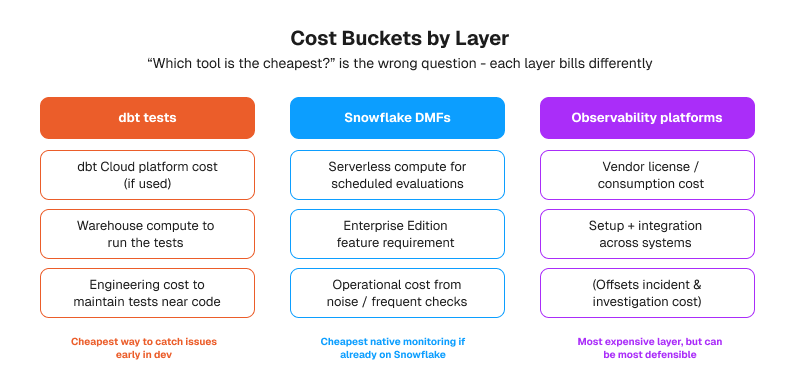
It is:
DMFs are often the cheapest way to add native monitoring if you are already on Snowflake and keep the scope tight.
dbt tests are often the cheapest way to catch issues early in development because they ride on the workflow many teams already have.
External observability tools are usually the most expensive layer in direct spend, but they can be the most defensible when incident cost, lineage, ownership, and cross-system blast radius are real problems.
So…
If your stack is small and Snowflake-centric, DMFs plus dbt tests are often enough and usually easier to justify.
If your stack is larger, the cost question shifts from “how much does the tool cost?” to “how expensive are slow incident response, unclear ownership, and missing lineage?”
That is the point where observability tooling starts to make economic sense.
Where DMFs stop and observability begins
DMFs are good at measuring the state of data available through Snowflake objects.
They can tell you that nulls appeared, freshness changed, row count moved, or a custom business rule was violated.
But detecting a problem is not the same as explaining the full incident.
A DMF does not automatically tell you:
- What changed upstream
- Which downstream models or dashboards are affected
- Who owns the affected data product
- Whether the issue is isolated or spreading
- How the incident should be routed
This is where external observability platforms such as Monte Carlo, Coalesce Quality, and similar tools become useful.
Their main value is not that they perform a better null check. Their value is wider operational context: lineage, ownership, impact analysis, incident routing, and root-cause investigation across a larger data stack.
The difference is scope.
DMFs provide native monitoring for data available through Snowflake objects.
Observability platforms become more useful when an organization needs to investigate incidents across multiple pipelines, platforms, and downstream consumers.
Recommended layered approach
The cleanest design is not to select one tool and force it to solve every data quality problem.
- Use each layer for the problem it handles best:
- Use dbt tests to validate transformation logic and catch regressions before deployment.
- Use Snowflake DMFs to monitor important production data after deployment.
- Use an observability platform when lineage, ownership, cross-system impact, and incident management become difficult to handle manually.
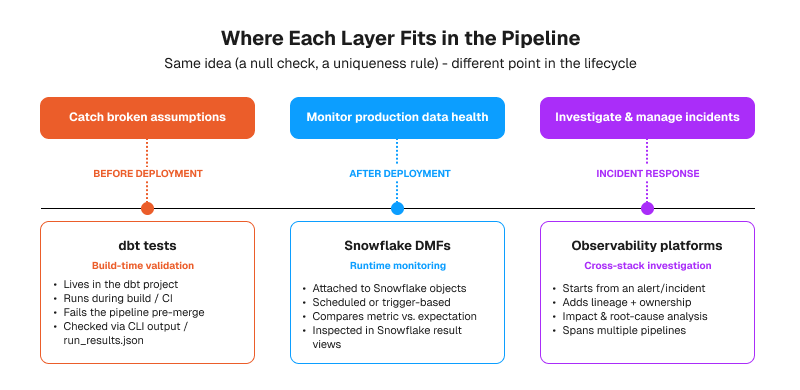
A smaller, Snowflake-focused stack may need only dbt tests and DMFs.
A larger environment may justify an additional observability layer because the cost of slow incident investigation can become greater than the cost of the tool itself.
The layering only holds if the rules themselves are worth running. Deciding which checks matter, who owns them, and what an acceptable threshold looks like is the part teams underestimate, and it is where most of our data quality work starts.
Final conclusion
Snowflake DMFs are not a replacement for every data quality tool. They add a specific layer to the stack: Snowflake-native monitoring for important production data.
dbt tests remain the better fit for validating transformation logic and catching regressions during development and CI/CD. They stay close to the code and can stop a bad change before it reaches production.
DMFs solve a different problem. They measure deployed data on a schedule or after supported changes, compare the results with expectations, and keep monitoring history inside Snowflake.
External observability platforms become useful when the problem extends beyond one monitored object. They add wider context such as lineage, ownership, downstream impact, incident routing, and root-cause analysis.
The tools overlap in the checks they can perform, but they do not play the same operational role.
The right question is not which tool wins.
It is which layer your team actually needs.
FAQ
What is the difference between Snowflake Data Metric Functions and dbt tests?
They run at different points in the lifecycle. A dbt test lives in the transformation project, is version controlled with the model code, and runs during a build or CI job, so it can stop a change before it reaches production. A Snowflake DMF is attached to an object that already exists and runs on a schedule or after supported data changes, so it reports on the state of deployed data. The rule types overlap. The authority each one has does not.
Are Snowflake DMFs and dbt tests interchangeable?
No, even though both can check nulls, uniqueness, or a custom business rule. Swapping one for the other changes what you protect. If you replace dbt tests with DMFs, nothing blocks a bad model change before merge. If you replace DMFs with dbt tests, nothing watches the table between builds. Most Snowflake-centric teams end up running both, with dbt tests as the pre-merge gate and DMFs as the runtime monitoring layer.
Can Snowflake DMFs be used as a CI/CD pull-request gate?
Technically yes, because a DMF can be called directly in SQL without waiting for a scheduled evaluation. In practice it is not worth it. You still need a Snowflake object holding the data, the right privileges, SQL execution inside the pipeline, logic that interprets the returned value, and a threshold that decides whether the build fails. At that point the DMF is an ad hoc validation query, and a dbt test does the same job with less wiring. Use CI/CD to deploy DMFs, not to wait on them.
Do Snowflake Data Metric Functions require Snowflake Enterprise Edition?
Data Quality Monitoring is an Enterprise Edition feature, so that is the practical requirement for running DMFs as scheduled checks. Scheduled evaluations also consume serverless compute, and Snowflake reports daily credit usage through ACCOUNT_USAGE.DATA_QUALITY_MONITORING_USAGE_HISTORY. Worth checking your edition and your credit baseline before planning a wide rollout. Snowflake develops these features quickly, so confirm the current terms in the official documentation.
Can Snowflake DMFs replace an external data observability tool like Monte Carlo?
Only if your data estate stops at Snowflake and your main need is measurement. A DMF tells you that a metric crossed a threshold on one object. It does not tell you what changed upstream, which dashboards are affected, who owns the data product, or how to route the incident. Platforms like Monte Carlo are built around lineage, impact analysis, ownership, and root-cause investigation across multiple systems. For a small Snowflake-only stack, DMFs plus dbt tests are often enough. For a larger estate, the two solve different problems.
How often can a Snowflake DMF run and what are the minimum schedule intervals?
Interval scheduling accepts a fixed set of values: 5, 15, 30, 60, 720, and 1440 minutes. Cron scheduling gives you more control over timing, but the effective interval still cannot go below five minutes. Trigger-based scheduling with TRIGGER_ON_CHANGES reacts to data changes on supported table-like objects, is not available for views, and does not fire on reclustering alone. Frequency is also a cost decision, since every scheduled evaluation is billed when computed.
Would you like more information about this topic?
Complete the form below.